
How to download from youtube via python
If you are interested, you can find the latest update in utdl repository
Here is a summary of the main functionality.
Description
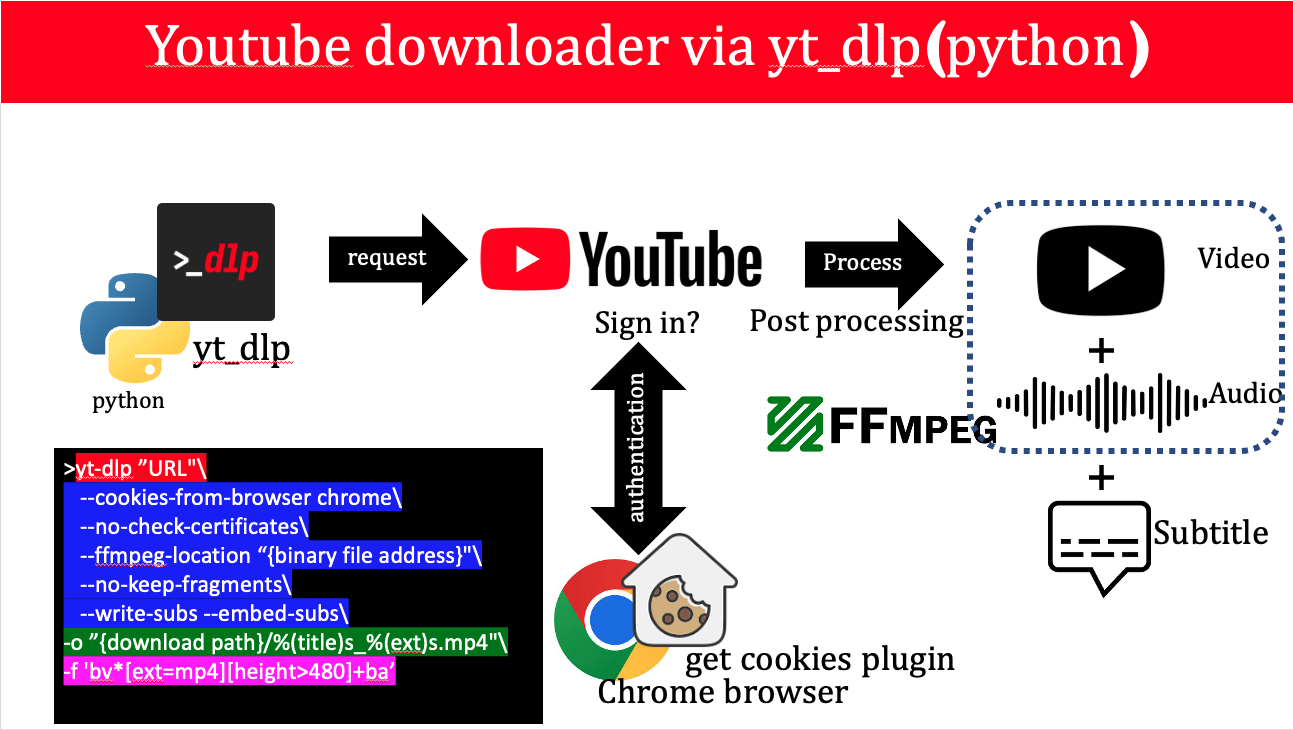
MAC OS
Installation
- check python
python3 –version
-
install yt_dlp sudo curl -L https://github.com/yt-dlp/yt-dlp/releases/latest/download/yt-dlp -o /usr/local/bin/yt-dlp sudo chmod a+rx /usr/local/bin/yt-dlp
-
download ffmpeg binary file
note: no install needed. just it’s binary is enough. give the binary path in command
Example 1 (Dowload video/playlist with subtitle using cookies)
yt-dlp "https://www.youtube.com/watch?v=9w8QYW5Wsh0"\
    --cookies-from-browser chrome\
    --no-check-certificates\
    --ffmpeg-location "/Users/meysam/Documents/Develop/utdl/ffmpeg"\
    --no-keep-fragments\
    --write-subs --embed-subs\
    -o "/Users/meysam/Downloads/%(title)s_%(ext)s.mp4"\
    -f 'bv*[ext=mp4][height>720]+ba'
Example 2 (Dowload a section of video)
yt-dlp "https://www.youtube.com/watch?v=MNw9x53Ybos"\
    --cookies-from-browser chrome\
    --no-check-certificates\
    --ffmpeg-location "/Users/meysam/Documents/binary"\
    --no-keep-fragments\
    --write-subs --embed-subs\
    -o "/Users/meysam/Downloads/youtube/%(title)s_%(ext)s.mp4"\
    --download-sections "*2:00-3:00" --force-keyframes-at-cuts\
    -f 'bv*[ext=mp4][height>480]+ba'
Example 3 (Dowload music)
yt-dlp "https://www.youtube.com/watch?v=f2AnmLp3wvo"\
    --cookies-from-browser chrome\
    --no-keep-fragments\
    -o "/Users/meysam/Downloads/youtube/%(title)s_%(ext)s.mp3"\
    -f 'ba'
WINDOWS OS
Installation
- check python
python3 –version
- download and install yt-dlp.exe file
note: create a folder in drive C and add yt-dlp.exe to it. then add its path to env variable. now you can use yt-dlp command in cmd
- download and install ffmpeg.exe file
note: create a folder in drive C and add ffmpeg.exe to it. then add its path to env variable. now you can use ffmpeg command in cmd
- add get cookies plugin (chrome extension) and login to youtube and extract cookies. then give file path to the command
Example 1 (Dowload video/playlist with subtitle using cookies)
yt-dlp "https://www.youtube.com/watch?v=MNw9x53Ybos" `
    --cookies \\Mac\Home\Downloads\www.youtube.com_cookies.txt `
    --no-check-certificates `
    --no-keep-fragments `
    --write-subs --embed-subs `
    -o "\\Mac\Home\Downloads\%(title)s_%(ext)s.mp4" `
    -f 'bv*[ext=mp4][height>480]+ba'
Example 2 (Dowload a section of video)
yt-dlp "https://www.youtube.com/watch?v=MNw9x53Ybos" `
    --cookies \\Mac\Home\Downloads\www.youtube.com_cookies.txt `
    --no-check-certificates `
    --no-keep-fragments `
    --write-subs --embed-subs `
    -o "\\Mac\Home\Downloads\%(title)s_%(ext)s.mp4" `
    --download-sections "*2:00-3:00" `
	--force-keyframes-at-cuts `
    -f 'bv*[ext=mp4][height>480]+ba'
Example 3 (Dowload music)
yt-dlp "https://www.youtube.com/watch?v=y-d9WbR0emI" `
    --cookies \\Mac\Home\Downloads\www.youtube.com_cookies.txt `
    --no-keep-fragments `
    -o "\\Mac\Home\Downloads\%(title)s_%(ext)s.mp3" `
    -f 'ba'
Note (always update yt_dlp before downloading)
1- install or update certifi on your os -> python3 -m pip install certifi
2- update yt-dlp to latest version -> yt-dlp -Uv