<?xml version="1.0" encoding="utf-8"?><feed xmlns="http://www.w3.org/2005/Atom" ><generator uri="https://jekyllrb.com/" version="3.10.0">Jekyll</generator><link href="https://meysamasgari.github.io/feed.xml" rel="self" type="application/atom+xml" /><link href="https://meysamasgari.github.io/" rel="alternate" type="text/html" /><updated>2025-08-30T17:42:44+01:00</updated><id>https://meysamasgari.github.io/feed.xml</id><title type="html">System Developer</title><subtitle>My personal website</subtitle><author><name>Meysam Asgari</name></author><entry><title type="html">How to download from youtube via python</title><link href="https://meysamasgari.github.io/youtube-dl/" rel="alternate" type="text/html" title="How to download from youtube via python" /><published>2025-08-24T00:00:00+01:00</published><updated>2025-08-24T00:00:00+01:00</updated><id>https://meysamasgari.github.io/youtube-dl</id><content type="html" xml:base="https://meysamasgari.github.io/youtube-dl/"><![CDATA[<p>If you are interested, you can find the latest update in <a href="https://github.com/meysamasgari/utdl">utdl repository</a></p>

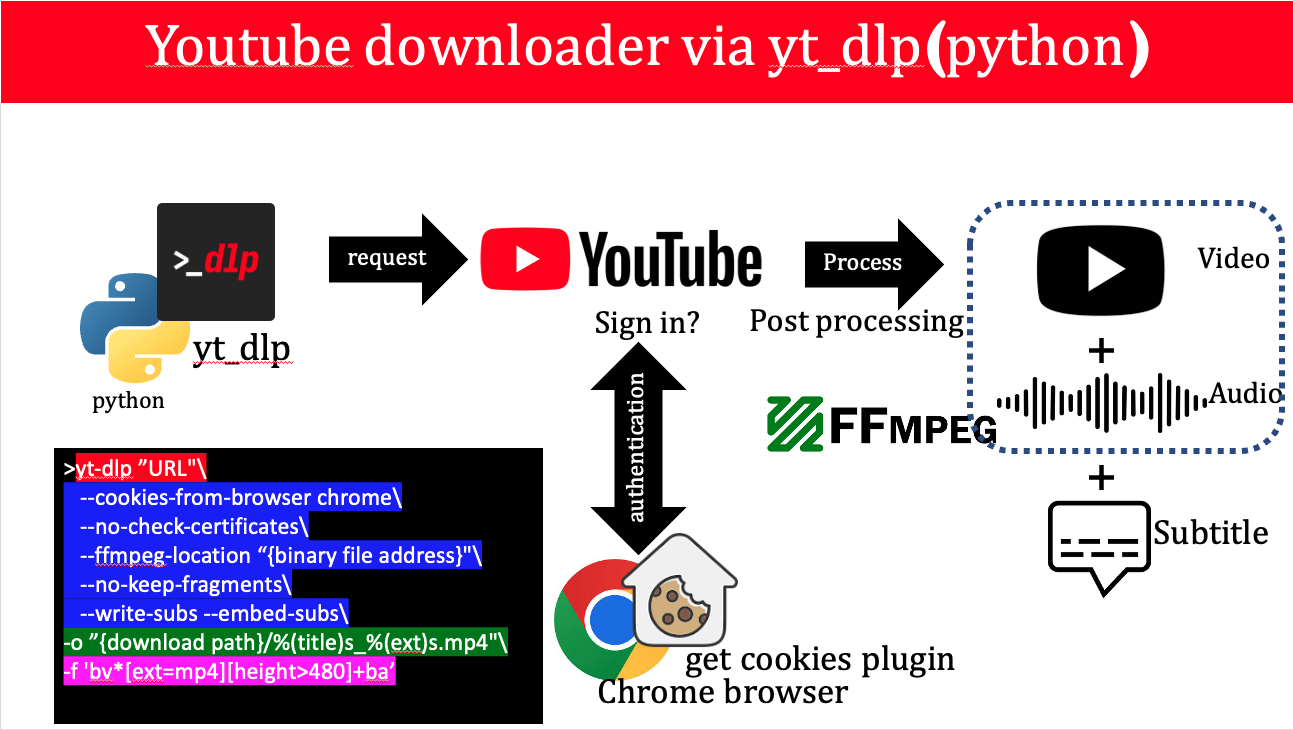
<p>Here is a summary of the main functionality.</p>

<h2 id="description">Description</h2>

<figure class="align-center">
  <img src="https://meysamasgari.github.io/images/yt-dlp-diagram.jpg" alt="" width="100%" />
    <figcaption>Download from youtube via yt_dlp</figcaption>
</figure>

<h1 id="mac-os">MAC OS</h1>
<h2 id="installation">Installation</h2>

<ol>
  <li>check <a href="https://www.python.org/downloads/">python</a></li>
</ol>

<p>python3 –version</p>

<ol>
  <li>
    <p>install yt_dlp
sudo curl -L https://github.com/yt-dlp/yt-dlp/releases/latest/download/yt-dlp -o /usr/local/bin/yt-dlp
sudo chmod a+rx /usr/local/bin/yt-dlp</p>
  </li>
  <li>
    <p>download ffmpeg <a href="https://www.ffmpeg.org/download.html">binary file</a></p>
  </li>
</ol>

<p>note: no install needed. just it’s binary is enough. give the binary path in command</p>

<h2 id="example-1-dowload-videoplaylist-with-subtitle-using-cookies">Example 1 (Dowload video/playlist with subtitle using cookies)</h2>
<div class="language-terminal highlighter-rouge"><div class="highlight"><pre class="highlight"><code><span class="go">yt-dlp "https://www.youtube.com/watch?v=9w8QYW5Wsh0"\
    --cookies-from-browser chrome\
    --no-check-certificates\
    --ffmpeg-location "/Users/meysam/Documents/Develop/utdl/ffmpeg"\
    --no-keep-fragments\
    --write-subs --embed-subs\
    -o "/Users/meysam/Downloads/%(title)s_%(ext)s.mp4"\
</span><span class="gp">    -f 'bv*[ext=mp4][height&gt;</span>720]+ba<span class="s1">' 
</span></code></pre></div></div>
<h2 id="example-2-dowload-a-section-of-video">Example 2 (Dowload a section of video)</h2>
<div class="language-terminal highlighter-rouge"><div class="highlight"><pre class="highlight"><code><span class="go">yt-dlp "https://www.youtube.com/watch?v=MNw9x53Ybos"\
    --cookies-from-browser chrome\
    --no-check-certificates\
    --ffmpeg-location "/Users/meysam/Documents/binary"\
    --no-keep-fragments\
    --write-subs --embed-subs\
    -o "/Users/meysam/Downloads/youtube/%(title)s_%(ext)s.mp4"\
    --download-sections "*2:00-3:00" --force-keyframes-at-cuts\
</span><span class="gp">    -f 'bv*[ext=mp4][height&gt;</span>480]+ba<span class="s1">'
</span></code></pre></div></div>
<h2 id="example-3-dowload-music">Example 3 (Dowload music)</h2>
<div class="language-terminal highlighter-rouge"><div class="highlight"><pre class="highlight"><code><span class="go">yt-dlp "https://www.youtube.com/watch?v=f2AnmLp3wvo"\
    --cookies-from-browser chrome\
    --no-keep-fragments\
    -o "/Users/meysam/Downloads/youtube/%(title)s_%(ext)s.mp3"\
    -f 'ba'
</span></code></pre></div></div>

<h1 id="windows-os">WINDOWS OS</h1>
<h2 id="installation-1">Installation</h2>
<ol>
  <li>check <a href="https://www.python.org/downloads/">python</a></li>
</ol>

<p>python3 –version</p>

<ol>
  <li>download and install <a href="https://github.com/yt-dlp/yt-dlp/releases/latest/download/yt-dlp.exe">yt-dlp.exe file</a></li>
</ol>

<p>note: create a folder in drive C and add yt-dlp.exe to it. then add its path to env variable. now you can use yt-dlp command in cmd</p>

<ol>
  <li>download and install <a href="https://www.gyan.dev/ffmpeg/builds/packages/ffmpeg-2025-08-25-git-1b62f9d3ae-full_build.7z">ffmpeg.exe file</a></li>
</ol>

<p>note: create a folder in drive C and add ffmpeg.exe to it. then add its path to env variable. now you can use ffmpeg command in cmd</p>

<ol>
  <li>add <a href="https://chromewebstore.google.com/detail/get-cookiestxt-locally/cclelndahbckbenkjhflpdbgdldlbecc">get cookies plugin</a> (chrome extension) and login to youtube and extract cookies. then give file path to the command</li>
</ol>

<h2 id="example-1-dowload-videoplaylist-with-subtitle-using-cookies-1">Example 1 (Dowload video/playlist with subtitle using cookies)</h2>
<div class="language-terminal highlighter-rouge"><div class="highlight"><pre class="highlight"><code><span class="go">yt-dlp "https://www.youtube.com/watch?v=MNw9x53Ybos" `
    --cookies \\Mac\Home\Downloads\www.youtube.com_cookies.txt `
    --no-check-certificates `
    --no-keep-fragments `
    --write-subs --embed-subs `
    -o "\\Mac\Home\Downloads\%(title)s_%(ext)s.mp4" `
</span><span class="gp">    -f 'bv*[ext=mp4][height&gt;</span>480]+ba<span class="s1">'
</span></code></pre></div></div>
<h2 id="example-2-dowload-a-section-of-video-1">Example 2 (Dowload a section of video)</h2>
<div class="language-terminal highlighter-rouge"><div class="highlight"><pre class="highlight"><code><span class="go">yt-dlp "https://www.youtube.com/watch?v=MNw9x53Ybos" `
    --cookies \\Mac\Home\Downloads\www.youtube.com_cookies.txt `
    --no-check-certificates `
    --no-keep-fragments `
    --write-subs --embed-subs `
    -o "\\Mac\Home\Downloads\%(title)s_%(ext)s.mp4" `
    --download-sections "*2:00-3:00" `
	--force-keyframes-at-cuts `
</span><span class="gp">    -f 'bv*[ext=mp4][height&gt;</span>480]+ba<span class="s1">'
</span></code></pre></div></div>
<h2 id="example-3-dowload-music-1">Example 3 (Dowload music)</h2>
<div class="language-terminal highlighter-rouge"><div class="highlight"><pre class="highlight"><code><span class="go">yt-dlp "https://www.youtube.com/watch?v=y-d9WbR0emI" `
    --cookies \\Mac\Home\Downloads\www.youtube.com_cookies.txt `
    --no-keep-fragments `
    -o "\\Mac\Home\Downloads\%(title)s_%(ext)s.mp3" `
    -f 'ba'
</span></code></pre></div></div>

<h1 id="note-always-update-yt_dlp-before-downloading">Note (always update yt_dlp before downloading)</h1>
<div class="language-plaintext highlighter-rouge"><div class="highlight"><pre class="highlight"><code>1- install or update certifi on your os -&gt; python3 -m pip install certifi
2- update yt-dlp to latest version -&gt; yt-dlp -Uv
</code></pre></div></div>]]></content><author><name>Meysam Asgari</name></author><category term="youtbue" /><category term="yt_dlp" /><category term="python" /><summary type="html"><![CDATA[Download Video/Playlist/Music from youtube in best quality with embedded subtitles]]></summary></entry></feed>